GPU-Cluster-Capacity-Simulator


GPU Cluster Capacity Simulator
A lightweight simulator for GPU cluster capacity planning for AI workloads.
Models utilization, queueing delay, packing / fragmentation, and a simplified cost view.
This project is intentionally infrastructure-focused.
It demonstrates how AI compute systems behave under load, rather than how to train or optimize ML models.
Demo
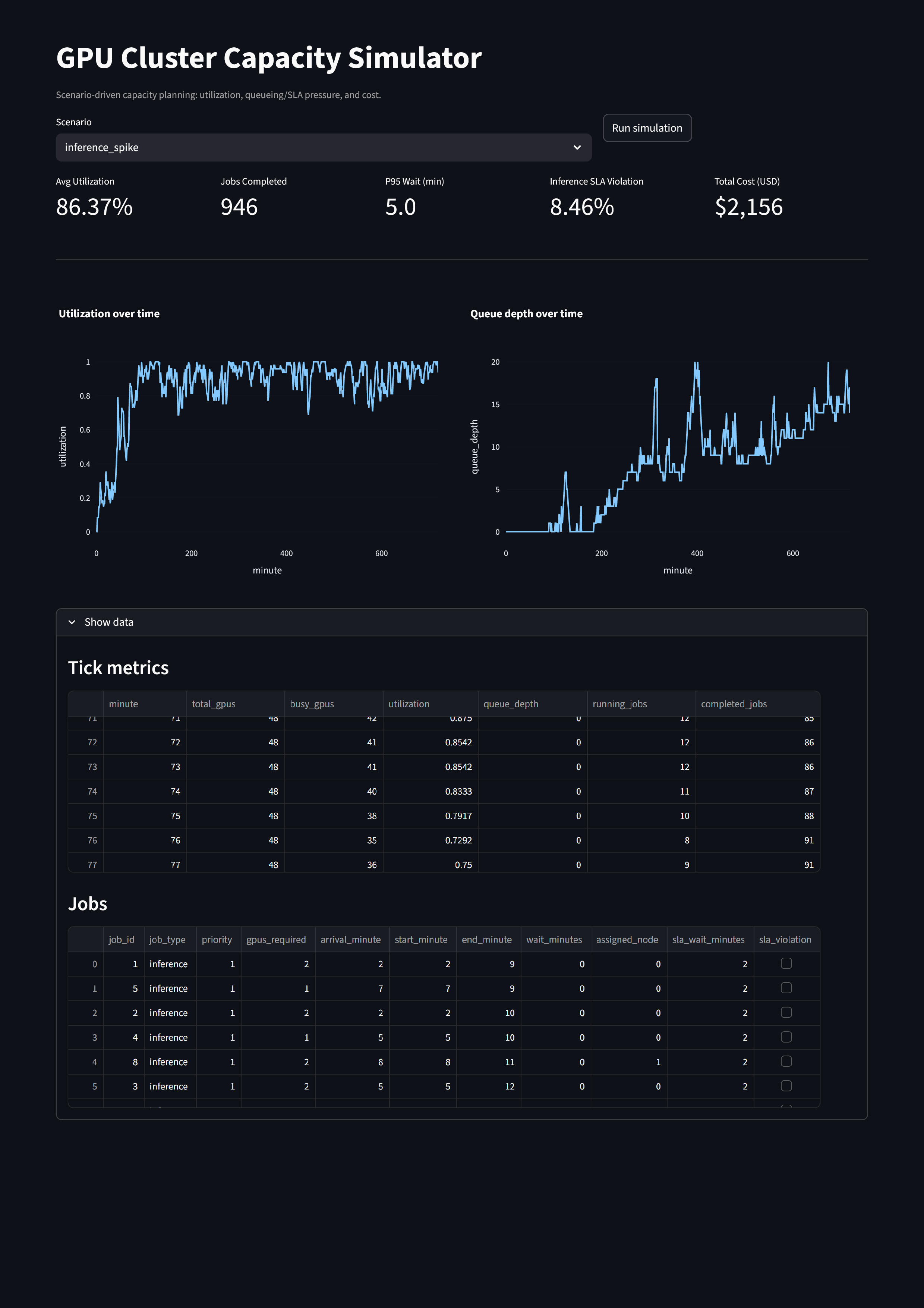
What this simulator models
Given a cluster configuration and workload arrival patterns, the simulator estimates:
- GPU utilization over time
- Queue depth and wait time (including P50 / P95 indicators)
- Inference SLA violations
- Cost efficiency (GPU-hours with overhead)
This mirrors the real tradeoffs faced in AI infrastructure, platform, and MLOps environments.
Architecture
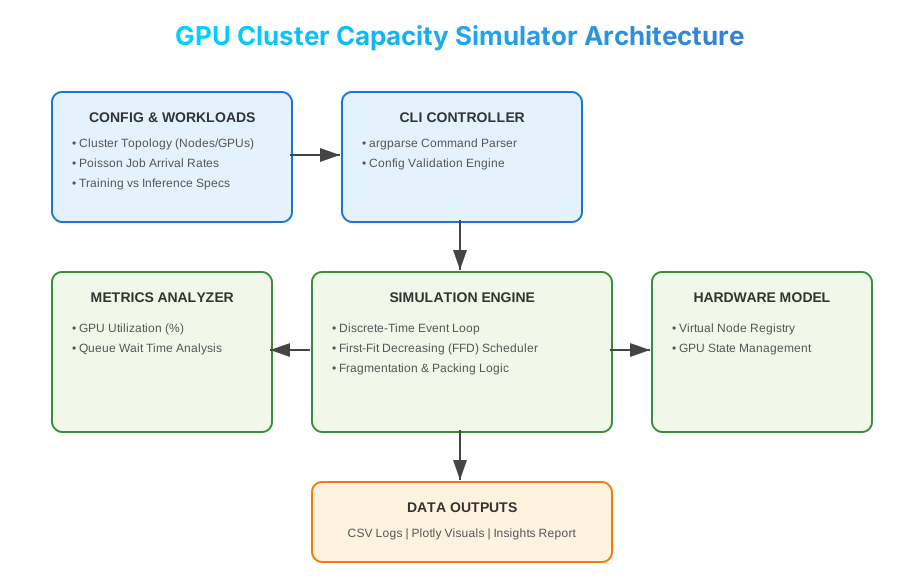
Execution flow
- Workload generator creates training and inference jobs
- Scheduler assigns jobs to GPUs (capturing packing + fragmentation effects)
- Simulator advances time and tracks system state
- Metrics and reports are generated for analysis
Quickstart
1) Install
python -m venv .venv
source .venv/bin/activate
python -m pip install -U pip
pip install -e ".[dev]"
2) Run a simulation
gpu-sim run --config configs/base.yaml \
  --out results/base_tick.csv \
  --out-jobs results/base_jobs.csv
Outputs
results/*_tick.csv→ utilization, queue depth, running/completed jobsresults/*_jobs.csv→ per-job wait time, assignment, SLA violations
Scenarios Included
| Config | Purpose |
|---|---|
configs/base.yaml |
Balanced training + inference baseline |
configs/mixed_workloads.yaml |
Contention and fragmentation under mixed loads |
configs/inference_spike.yaml |
SLA pressure during inference bursts |
configs/nvl_vs_pcie.yaml |
Sensitivity to reduced interconnect efficiency |
Run all scenarios:
gpu-sim run --config configs/base.yaml --out results/base_tick.csv --out-jobs results/base_jobs.csv
gpu-sim run --config configs/mixed_workloads.yaml --out results/mixed_tick.csv --out-jobs results/mixed_jobs.csv
gpu-sim run --config configs/inference_spike.yaml --out results/spike_tick.csv --out-jobs results/spike_jobs.csv
gpu-sim run --config configs/nvl_vs_pcie.yaml --out results/pcie_tick.csv --out-jobs results/pcie_jobs.csv
Results & Insights
GPU Utilization
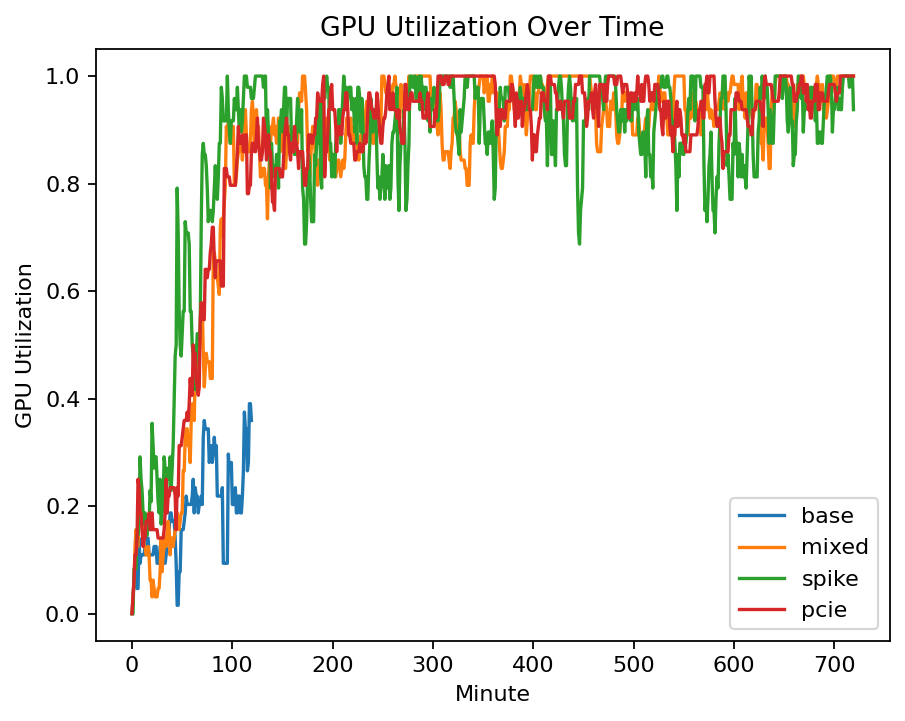
Insight
- High average utilization does not guarantee low latency
- Mixed workloads reduce effective throughput due to fragmentation
Queue Depth & SLA Pressure

Insight
- Queue depth grows rapidly under bursty inference traffic
- SLA violations often appear before GPUs look fully saturated
Streamlit Dashboard (Live, Interactive)
Run an interactive dashboard to compare scenarios and visualize utilization and queueing behavior.
pip install -r requirements.txt
streamlit run app.py
The dashboard supports:
- Scenario selection
- Live simulation execution
- KPI cards (utilization, P95 wait, SLA rate, cost)
- Time-series plots for utilization and queue depth
Development & Quality
pytest -q
ruff check .
CI runs automatically via GitHub Actions.
Why this project exists
AI infrastructure performance is rarely a pure “GPU count” problem.
This simulator highlights why real-world outcomes depend on:
- Workload mix (training vs inference)
- Scheduling and packing
- Queueing dynamics
- SLA design
- Cost vs reliability tradeoffs
These considerations are central to modern AI platforms, cloud infrastructure, and MLOps systems.
Roadmap
- Pool partitioning (training vs inference)
- Priority scheduling and preemption
- Trace-driven workloads
- Multi-cluster comparisons
- More detailed cost models (power, networking)
🤝 Contributing
This is a demonstration project for portfolio. If you’d like to extend it:
- Fork the repository
- Create a feature branch
- Add enhancements (new models, visualizations, data sources)
- Submit a pull request
📧 Contact
Let’s connect! Whether you have a question or just want to say hi, feel free to reach out.
| Platform | Link |
|---|---|
| 👤 Name | Sourabh Tarodekar |
| sourabh232@gmail.com | |
| linkedin.com/in/sourabh232 | |
| 🚀 Portfolio | QuantuMaster007 Portfolio |
📄 License
MIT License - See LICENSE file for details